
Affiliate disclosure: some links in this article may be affiliate links. If you sign up through them, we may earn a commission at no extra cost to you. See our Terms of Service.
A supplier sends an invoice for 10 units at 25 each. Your colleague in purchasing remembers ordering 10 units at 25. Your colleague in the warehouse remembers receiving 8. Nobody has all three facts in front of them, so the invoice goes to payment for 10, and the missing 2 units are a conversation you have three months later. This is the oldest control in accounts payable: before you pay, check that the invoice, the purchase order and the goods receipt tell the same story. Accountants call it a 3-way match.
This free n8n workflow runs a simple version of it using nothing but Google Sheets and Gmail. Someone submits an invoice through a small web form. The workflow first checks that the same vendor and invoice number are not already in your register, and blocks the submission if they are. If the invoice is new, it is added to the register, the workflow looks up the purchase order and the goods receipt in two other sheet tabs, compares the numbers in code, and sets the status to READY_FOR_PAYMENT or PAYMENT_HOLD, with the reasons written down. Finance gets an email either way. This guide explains each step in plain English, shows with worked examples what passes and what fails, and is direct about what this kind of check does not protect you from.
Read this first: what a “match” does and does not prove
- It compares typed numbers, not the invoice. The workflow never sees the vendor’s invoice. It compares what the submitter typed into the form with your PO and receipt sheets. Someone who types matching numbers gets READY_FOR_PAYMENT.
- One line per invoice. The form takes one item per submission, and the duplicate check uses vendor plus invoice number only. A second item from the same invoice is blocked as a duplicate.
- It can get stuck. The invoice is saved as PENDING_MATCH before matching. If a later step fails, the row stays pending, and the same invoice number is then blocked as a duplicate when someone tries again.
Nothing in this workflow pays anyone. READY_FOR_PAYMENT is a label in a sheet. Treat it as a suggestion for a person to confirm, never as an approval.
Template source: this workflow comes from the n8n Library at n8n.io, the public collection of workflow templates. We did not create it. LeenLabs prepared its JSON for publication and documented it. What we changed is listed in the section What we changed in the original template.
At a glance
- What it does: takes an invoice from a form, blocks duplicates, matches it to a purchase order and goods receipt, sets a status, and emails Finance.
- Apps used: n8n, Google Sheets and Gmail.
- Trigger: a form submission.
- Setup effort: medium. Two logins, three sheet tabs with exact column names, and one email address.
- Cost to run: no AI service is involved. Only your n8n plan and the limits of Google apply.
- Watch out for: typed data instead of the real invoice, exact-equality checks that fail on tax and some decimals, rows stuck as pending, and an open form link.
- Test status: the matching code was tested on simulated data outside n8n; the full file was not run on live services.
In this guide
- Three documents that must agree
- Words you will see in this guide
- Apps and accounts this workflow talks to
- What to have ready before you import anything
- What passes and what fails: worked examples
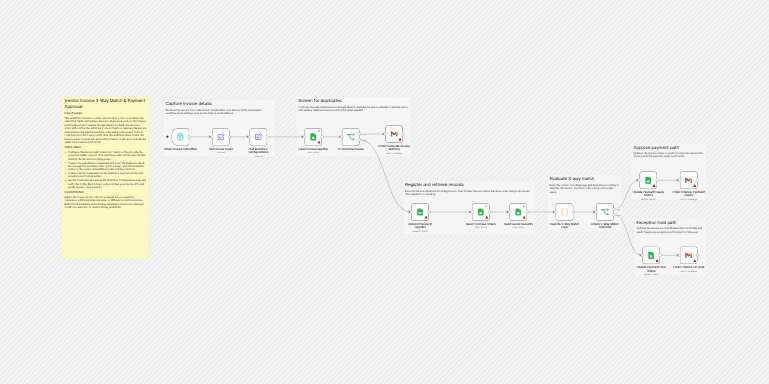
- The big picture: from form to Finance
- Follow the data: what each of the 15 steps does
- Get the workflow JSON
- Install it in twelve steps
- What it will not do: limits, costs and trade-offs
- Access, privacy and responsible use
- Problems you may meet and how to fix them
- Too much of a puzzle? Let us build or adapt it for you
- What we changed in the original template
- What was verified, and what was not
- Five ways to adapt the workflow
- Frequently asked questions
- Tools used in this workflow
- Suggested reading
- Keep exploring
Three documents that must agree
Every purchase leaves up to three paper trails. The purchase order (PO) says what you agreed to buy: item, quantity, unit price. The goods receipt (sometimes called a GRN, for goods received note) says what actually arrived. The invoice says what the supplier now wants to be paid. If all three agree, paying is safe. If they do not, something needs a human: a wrong price, a short delivery, a duplicate, an invoice for something nobody ordered.
Doing this by hand is slow and boring, which is exactly why it is skipped when people are busy. The idea of this workflow is to make the boring part automatic and put the interesting part, the exceptions, in front of a person with the reasons written out. It also adds a guard that many beginner workflows lack: a duplicate check, so the same invoice cannot be entered twice.
In one run, the workflow does these jobs:
- Collects the invoice details through a form.
- Cleans the IDs (removes spaces, makes capital letters) and builds a unique key from vendor and invoice number.
- Checks the register for the same key, and blocks duplicates with an email to the submitter.
- Registers new invoices with the status PENDING_MATCH.
- Looks up the purchase order and the goods receipt.
- Compares vendor, item, PO number, currency, quantities, unit price and total.
- Updates the status and emails Finance, with the list of problems when the match fails.
It suits a small business that already keeps its purchase orders and goods receipts in Google Sheets and receives a modest number of single-item invoices. It does not suit you if invoices have several lines, include tax or shipping, or arrive as PDFs that nobody types in. For PDFs, see our guide on auto-capturing supplier invoices from Gmail, which reads the PDF itself.
Words you will see in this guide
- n8n (say “n-eight-n”): a tool that connects apps and makes them follow your instructions automatically.
- Workflow: one set of instructions in n8n, drawn as boxes connected by lines.
- Node: one box in a workflow. Each node does one job.
- Trigger: the node that starts a workflow. Here, a form submission.
- PO (purchase order): your order to a supplier, with item, quantity and price.
- GRN (goods received note): the record that the goods arrived, and how many.
- 3-way match: checking that the invoice, the PO and the receipt agree.
- SKU / item code: the code that identifies a product.
- Invoice register: the list of all invoices you have received. Here, a Google Sheets tab.
- Duplicate invoice: the same invoice entered twice, which risks paying it twice.
- Exception: an invoice that fails a check and needs a person to look at it.
- Payment hold: the status of an exception: do not pay until it is resolved.
- Expression: a small formula inside a node, written between double curly brackets, that fetches or calculates a value.
- Code node: a node that runs a small program written in JavaScript.
- Credential: a saved login that lets n8n use one of your accounts. The JSON file does not contain yours.
Apps and accounts this workflow talks to
- n8n: runs the workflow and hosts the form page, hosted or self-hosted.
- Google Sheets: holds three tabs: the invoice register, the purchase orders and the goods receipts. The workflow reads all three and writes to the register.
- Gmail: sends three kinds of email, from the account you connect: a duplicate warning to the submitter, and a ready or hold notice to Finance.
Costs: the workflow file is free. n8n, Google and Gmail each have their own plans and limits. We do not quote prices because they change; check each provider’s current pricing page.
What to have ready before you import anything
- An n8n account or installation where you can create workflows.
- One Google Sheets spreadsheet with three tabs named exactly
Invoice Register,Purchase OrdersandGoods Receipts. - In row 1 of
Invoice Register:vendorId,vendorName,invoiceNumber,invoiceDate,poNumber,grnNumber,itemCode,invoiceQuantity,unitPrice,invoiceTotal,currency,submitterEmail,status,submittedAt,invoiceKey,exceptionReason. - In row 1 of
Purchase Orders:poNumber,itemCode,vendorId,currency,orderedQuantity,unitPrice,poStatus. A PO counts as approved only ifpoStatusis exactlyAPPROVED. - In row 1 of
Goods Receipts:grnNumber,poNumber,itemCode,vendorId,receivedQuantity,receiptStatus. A receipt counts as received only ifreceiptStatusis exactlyRECEIVED. - In the PO and receipt tabs, write vendor IDs, PO numbers, GRN numbers and item codes in capital letters with no spaces, because the form entries are converted to capitals and compared exactly.
- The ID of your spreadsheet: the long code between
/d/and/editin its address. - The email address of the person in Finance who should receive the notices.
- A few fake test rows in the PO and receipt tabs, and a plan for the fake invoices you will submit.
The original template’s own notes list only some of these columns. We built the list above by reading what the code and the lookups use. If you skip one, a check silently misbehaves (see the problems section).
What passes and what fails: worked examples
The Code node called Execute 3-Way Match Logic does the comparing. It builds a list of reasons; if the list is empty, the invoice matches. We ran it on simulated data. The base case is a PO for 10 units of SKU-A at 25.00 in USD, approved; a receipt of 10 units, received; and an invoice for 10 units at 25.00 with a total of 250.00.
| Simulated case | Result | Reasons shown |
|---|---|---|
| The base case | READY_FOR_PAYMENT | None. |
| Invoice for 12 units | PAYMENT_HOLD | Invoice quantity exceeds ordered quantity; invoice quantity exceeds received quantity. |
| Invoice unit price 26.00 | PAYMENT_HOLD | Unit price mismatch; invoice total mismatch. |
| Total 275.00 (250 plus 10% tax) | PAYMENT_HOLD | Invoice total mismatch. Any invoice with tax fails. |
| PO not in the sheet | PAYMENT_HOLD | Purchase Order not found. |
| Receipt status PARTIAL | PAYMENT_HOLD | Goods Receipt is not received. |
| Currency EUR on the invoice, USD on the PO | PAYMENT_HOLD | Currency mismatch. |
| 3 units at 0.10, total 0.30 | PAYMENT_HOLD | Invoice total mismatch. False alarm: 3 times 0.1 is 0.30000000000000004 in the computer’s arithmetic. |
| 3 units at 19.99, total 59.97 | READY_FOR_PAYMENT | None. The same kind of arithmetic happened to work here, so you cannot predict it. |
| Invoice for 8 units (fewer than ordered), total 200.00 | READY_FOR_PAYMENT | None. Under-invoicing is allowed. |
| Quantity -5, total -125.00 | READY_FOR_PAYMENT | None. Negative quantities are not checked. |
| Quantity 0, total 0.00 | READY_FOR_PAYMENT | None. Zero is not checked. |
Receipt sheet has no receivedQuantity column, invoice for 5 units |
READY_FOR_PAYMENT | None. The quantity check against the receipt is skipped silently. |
PO sheet says approved in lowercase |
PAYMENT_HOLD | Purchase Order is not approved. Capital letters matter. |
Read the bold rows twice. The code is good at catching a wrong price, an excess quantity, a missing document or a currency difference. It is weak where the data is missing, negative or zero, and it is strict in a way that produces false alarms with tax and with some decimals. Those are limits to design around, not reasons to throw the idea away: a hold with a visible reason costs you a minute, while a silent pass costs you money.
The big picture: from form to Finance
- Submit. Someone fills in the form.
- Clean. IDs are trimmed and put in capitals, and a key like
V100|INV-1is built. - Screen. The register is searched for that key. A hit sends a warning to the submitter and stops.
- Register. A new invoice is added as PENDING_MATCH.
- Fetch. The PO row and the receipt row are read.
- Compare. The code lists any problems.
- Decide. No problems means ready for payment, otherwise on hold.
- Record and tell. The status is written to the register, and Finance gets an email.
Follow the data: what each of the 15 steps does
The names below match the names in the JSON file exactly.
When Invoice Submitted
The trigger: an n8n form titled “Vendor Invoice Submission”. The fields are Vendor Name, Vendor ID, Invoice Number, Invoice Date (a date picker), PO Number, GRN Number, Item / SKU Code, Invoice Quantity, Unit Price and Invoice Total (numbers), Currency (a dropdown with PKR, USD, EUR and GBP), Submitter Email, and Remarks (the only optional field). The form has no file upload, so the invoice itself is not attached. Anyone who has the link can submit, unless you restrict access.
Set Invoice Fields
Copies each form answer into a clean field. For vendor ID, invoice number, PO number, GRN number and item code, it removes spaces at both ends and converts to capital letters, so inv-1 and INV-1 count as the same. It also builds invoiceKey: the vendor ID, a vertical bar and the invoice number. The Remarks field is copied here but never used afterwards.
Set Workflow Configurations
Holds one setting, financeEmail, the address that receives the ready and hold notices. In the file, it is a placeholder (YOUR_FINANCE_EMAIL) that you replace. It passes the other fields along unchanged.
Read Invoice Register
A Google Sheets node that looks in the Invoice Register tab for rows whose vendorId and invoiceNumber match the new invoice. It is set to output an empty item when nothing matches, so that the workflow continues instead of stopping. You replace YOUR_GOOGLE_SHEET_ID with your spreadsheet ID.
If Duplicate Invoice
A yes-or-no node. It asks: does the item that came out of the register lookup have a non-empty invoice number? If yes, a matching row exists and the invoice is a duplicate; it goes to the first output. If no, it goes to the second. If the sheet holds several matching rows, the node would run once per row, which would likely send several warnings. We did not test that.
Email Duplicate Invoice Warning
A Gmail node that emails the submitter that a duplicate was detected and blocked, with vendor, vendor ID, invoice number and PO number, and the status DUPLICATE_BLOCKED. The address is the one typed into the form. Finance is not told about duplicates.
Append Invoice to Register
Adds the new invoice to the Invoice Register tab with the status PENDING_MATCH, with all the cleaned fields. This happens before the match, which is why a failure later leaves a pending row behind.
Read Purchase Orders
Looks in the Purchase Orders tab for rows with the same PO number and item code. It takes those two values from the item produced by the previous step. If the lookup finds nothing, an empty item moves on.
Read Goods Receipts
Looks in the Goods Receipts tab for rows with the same GRN number and item code, this time taking the values from Set Invoice Fields.
Execute 3-Way Match Logic
The Code node. It takes the invoice, the first matching PO row and the first matching receipt row, and builds a list of reasons. It checks: PO found and approved; vendor, item, PO number and currency equal; invoice quantity not above the ordered quantity; unit price equal to the PO price; receipt found and marked RECEIVED; receipt vendor, item, PO number and GRN number equal; invoice quantity not above the received quantity; and the invoice total equal to quantity times the PO unit price. All comparisons are exact, with no tolerance. It outputs one item with matchPassed, a status of MATCHED or MISMATCH, and the list of reasons.
Check 3-Way Match Outcome
A yes-or-no node on matchPassed. True goes to the ready path, false to the hold path.
Update Payment Ready Status
Finds the register row whose invoiceKey equals the invoice’s key and sets status to READY_FOR_PAYMENT.
Email Finance: Payment Ready
Emails the Finance address that the invoice passed matching, listing invoice number, vendor, PO, GRN, item, invoice and received quantities, total and currency. The subject uses the key from the previous step’s output. The text is one long paragraph, because it has no line breaks (we checked).
Update Payment Hold Status
Finds the same register row and sets status to PAYMENT_HOLD and exceptionReason to the list of reasons, joined by commas.
Email Finance: On Hold
Emails Finance that the invoice failed and is on hold, with the same details, the reasons, the invoice total and the expected total. When the PO was not found, the expected total is empty, and the text may show the word null.
Get the workflow JSON
Open the box below to copy the JSON, or download the file. It contains the 15 nodes above, connected as described, with placeholders for your spreadsheet ID and Finance email, and eight notes on the canvas. It contains none of your logins.
Please read this first: this JSON is free and provided as is. n8n versions and installed nodes differ from one person to another, so it may not run correctly on your side without adjustments. We cannot test it on every setup. That is why this article includes a long section, Problems you may meet and how to fix them. And if you would rather not deal with any of it, you can request a custom workflow and let us handle it.
Click to show or hide the workflow JSON
Click inside the box, select the whole text, copy it, then paste it onto an empty n8n canvas. If selecting is awkward on your device, use the download link above.
{
"name": "Vendor Invoice 3-Way Match with n8n (free workflow JSON)",
"nodes": [
{
"id": "aaf16a4f-1e1e-4576-b909-0080a6f2fca7",
"name": "Overview",
"type": "n8n-nodes-base.stickyNote",
"position": [
0,
0
],
"parameters": {
"width": 480,
"height": 1000,
"content": "## Vendor invoice 3-way match with duplicate check\n\nA person submits one vendor invoice line through an n8n form. The workflow blocks the submission if the same Vendor ID and Invoice Number are already in the register. Otherwise it adds the invoice to the register as PENDING_MATCH, looks up the purchase order and the goods receipt in Google Sheets, compares them in code, and sets the status to READY_FOR_PAYMENT or PAYMENT_HOLD. Finance is told by email. Nothing is paid by this workflow.\n\n### How it works\n\n1. When Invoice Submitted: the form.\n2. Set Invoice Fields: trims and upper-cases the IDs and builds invoiceKey (VENDORID|INVOICENUMBER).\n3. Set Workflow Configurations: holds financeEmail.\n4. Read Invoice Register: looks for the same vendor and invoice number.\n5. If Duplicate Invoice: duplicate goes to Email Duplicate Invoice Warning; otherwise to Append Invoice to Register.\n6. Read Purchase Orders and Read Goods Receipts: take the first matching row.\n7. Execute 3-Way Match Logic: builds a list of exception reasons.\n8. Check 3-Way Match Outcome: no reasons means ready, otherwise hold.\n9. Update the status in the register and email Finance.\n\n### Setup\n\n1. Connect Google Sheets and Gmail credentials.\n2. Replace YOUR_GOOGLE_SHEET_ID in every Google Sheets node with your spreadsheet ID.\n3. Replace YOUR_FINANCE_EMAIL in Set Workflow Configurations.\n4. Create three tabs with these headers in row 1.\nInvoice Register: vendorId, vendorName, invoiceNumber, invoiceDate, poNumber, grnNumber, itemCode, invoiceQuantity, unitPrice, invoiceTotal, currency, submitterEmail, status, submittedAt, invoiceKey, exceptionReason.\nPurchase Orders: poNumber, itemCode, vendorId, currency, orderedQuantity, unitPrice, poStatus (APPROVED when approved).\nGoods Receipts: grnNumber, poNumber, itemCode, vendorId, receivedQuantity, receiptStatus (RECEIVED when received).\n5. Write IDs in the PO and receipt tabs in upper case, without spaces.\n6. Test with the form's test URL before publishing.\n\n### Customize\n\n- Tolerances, tax and extra rules: Execute 3-Way Match Logic.\n- Currencies: the dropdown in the form.\n- Email wording: the three Gmail nodes.\n\nSource: based on a template from the n8n Library at n8n.io, documented by LeenLabs.\nNot tested on live APIs."
},
"typeVersion": 1
},
{
"id": "83e643a0-4b0c-4dd7-b2dc-454d73a7afef",
"name": "Sticky Note1",
"type": "n8n-nodes-base.stickyNote",
"position": [
560,
16
],
"parameters": {
"color": 7,
"width": 624,
"height": 320,
"content": "## Capture invoice details\n\nReceives the invoice form submission, standardizes core invoice fields, and applies workflow-level settings such as the finance email address."
},
"typeVersion": 1
},
{
"id": "d2b5434c-8ea4-4090-b283-d1ab362e81af",
"name": "Sticky Note2",
"type": "n8n-nodes-base.stickyNote",
"position": [
1296,
0
],
"parameters": {
"color": 7,
"width": 640,
"height": 336,
"content": "## Screen for duplicates\n\nLooks up the submitted invoice in Google Sheets, branches based on whether it already exists, and sends a duplicate invoice notification when needed."
},
"typeVersion": 1
},
{
"id": "7b1087b5-076a-43dc-807f-fcb34b45fd10",
"name": "Sticky Note3",
"type": "n8n-nodes-base.stickyNote",
"position": [
1888,
464
],
"parameters": {
"color": 7,
"width": 736,
"height": 304,
"content": "## Register and retrieve records\n\nRecords the non-duplicate incoming invoice, then fetches the associated purchase order and goods receipt data needed for matching."
},
"typeVersion": 1
},
{
"id": "7aaa0432-7474-4856-93e5-85d5d8c8941e",
"name": "Sticky Note4",
"type": "n8n-nodes-base.stickyNote",
"position": [
2688,
432
],
"parameters": {
"color": 7,
"width": 416,
"height": 320,
"content": "## Evaluate 3-way match\n\nRuns the custom matching logic and branches according to whether the invoice, purchase order, and goods receipt agree."
},
"typeVersion": 1
},
{
"id": "bdee05ee-cc02-400e-be0e-98a9a1081b05",
"name": "Sticky Note5",
"type": "n8n-nodes-base.stickyNote",
"position": [
3152,
256
],
"parameters": {
"color": 7,
"width": 416,
"height": 320,
"content": "## Approve payment path\n\nUpdates the invoice status to ready for payment and emails finance with the payment-ready notification."
},
"typeVersion": 1
},
{
"id": "3cbcedad-926c-4d58-b76a-b0a6308af0d0",
"name": "Sticky Note6",
"type": "n8n-nodes-base.stickyNote",
"position": [
3168,
672
],
"parameters": {
"color": 7,
"width": 400,
"height": 320,
"content": "## Exception hold path\n\nUpdates the invoice as on hold when the match fails and sends finance an exception notification for follow-up."
},
"typeVersion": 1
},
{
"id": "0e59c634-d944-42bd-8d8d-11639908f1a0",
"name": "When Invoice Submitted",
"type": "n8n-nodes-base.formTrigger",
"position": [
608,
176
],
"parameters": {
"options": {},
"formTitle": "Vendor Invoice Submission",
"formFields": {
"values": [
{
"fieldLabel": "Vendor Name",
"requiredField": true
},
{
"fieldLabel": "Vendor ID",
"requiredField": true
},
{
"fieldLabel": "Invoice Number",
"requiredField": true
},
{
"fieldType": "date",
"fieldLabel": "Invoice Date",
"requiredField": true
},
{
"fieldLabel": "PO Number",
"requiredField": true
},
{
"fieldLabel": "GRN Number",
"requiredField": true
},
{
"fieldLabel": "Item / SKU Code",
"requiredField": true
},
{
"fieldType": "number",
"fieldLabel": "Invoice Quantity",
"requiredField": true
},
{
"fieldType": "number",
"fieldLabel": "Unit Price",
"requiredField": true
},
{
"fieldType": "number",
"fieldLabel": "Invoice Total",
"requiredField": true
},
{
"fieldType": "dropdown",
"fieldLabel": "Currency",
"fieldOptions": {
"values": [
{
"option": "PKR"
},
{
"option": "USD"
},
{
"option": "EUR"
},
{
"option": "GBP"
}
]
},
"requiredField": true
},
{
"fieldType": "email",
"fieldLabel": "Submitter Email",
"requiredField": true
},
{
"fieldType": "textarea",
"fieldLabel": "Remarks"
}
]
},
"formDescription": "Submit vendor invoice details for duplicate validation and PO-GRN-Invoice matching."
},
"typeVersion": 2.6
},
{
"id": "b46860e1-30c4-4377-9f28-2164ee63891a",
"name": "Set Invoice Fields",
"type": "n8n-nodes-base.set",
"position": [
832,
176
],
"parameters": {
"options": {},
"assignments": {
"assignments": [
{
"id": "2986ac7b-f84a-49fd-86db-608c19bb11e1",
"name": "vendorName",
"type": "string",
"value": "={{$json[\"Vendor Name\"]}}"
},
{
"id": "f6b25ff7-67ce-45ec-ac1b-5eea63295b09",
"name": "vendorId",
"type": "string",
"value": "={{$json[\"Vendor ID\"].trim().toUpperCase()}}"
},
{
"id": "f751617a-f654-407a-a064-c08606f13690",
"name": "invoiceNumber",
"type": "string",
"value": "={{$json[\"Invoice Number\"].trim().toUpperCase()}}"
},
{
"id": "09947e66-a202-402c-81a0-68a34487943f",
"name": "invoiceDate",
"type": "string",
"value": "={{$json[\"Invoice Date\"]}}"
},
{
"id": "2b1fd86e-d969-4198-9bc8-20aca59ee057",
"name": "poNumber",
"type": "string",
"value": "={{$json[\"PO Number\"].trim().toUpperCase()}}"
},
{
"id": "e7ec44b2-06d9-4b0a-87d8-96b3447623da",
"name": "grnNumber",
"type": "string",
"value": "={{$json[\"GRN Number\"].trim().toUpperCase()}}"
},
{
"id": "e3d65106-2176-4dc0-bb75-d1330453a797",
"name": "itemCode",
"type": "string",
"value": "={{$json[\"Item / SKU Code\"].trim().toUpperCase()}}"
},
{
"id": "5fcdec6f-e3b6-4e1f-b744-a6943528e5e8",
"name": "invoiceQuantity",
"type": "number",
"value": "={{$json[\"Invoice Quantity\"]}}"
},
{
"id": "6a10b8e1-5540-456f-8fff-bc929cc44665",
"name": "unitPrice",
"type": "number",
"value": "={{$json[\"Unit Price\"]}}"
},
{
"id": "bbfbc877-9c62-4d35-8fce-1cd49719fa79",
"name": "invoiceTotal",
"type": "number",
"value": "={{$json[\"Invoice Total\"]}}"
},
{
"id": "23b6cbcd-e77a-40ea-95aa-9de0b64da45f",
"name": "currency",
"type": "string",
"value": "={{$json[\"Currency\"]}}"
},
{
"id": "fff31db5-edb5-4d77-bb94-7f2e813585c7",
"name": "submitterEmail",
"type": "string",
"value": "={{$json[\"Submitter Email\"]}}"
},
{
"id": "e118f252-d7c3-492e-8170-065accc33465",
"name": "remarks",
"type": "string",
"value": "={{$json[\"Remarks\"]}}"
},
{
"id": "da5c6e87-34d3-463a-8082-97ee391f6e0b",
"name": "submittedAt",
"type": "string",
"value": "={{$json[\"submittedAt\"]}}"
},
{
"id": "b3aa5db7-b62d-4aa0-89ab-d2f5facc8473",
"name": "invoiceKey",
"type": "string",
"value": "={{$json[\"Vendor ID\"].trim().toUpperCase() + '|' + $json[\"Invoice Number\"].trim().toUpperCase()}}"
}
]
}
},
"typeVersion": 3.5
},
{
"id": "59e8ed06-fa64-47c6-aae0-b95daf421f17",
"name": "Read Invoice Register",
"type": "n8n-nodes-base.googleSheets",
"position": [
1344,
176
],
"parameters": {
"options": {},
"filtersUI": {
"values": [
{
"lookupValue": "={{$json.vendorId}}",
"lookupColumn": "vendorId"
},
{
"lookupValue": "={{$json.invoiceNumber}}",
"lookupColumn": "invoiceNumber"
}
]
},
"sheetName": {
"__rl": true,
"mode": "name",
"value": "Invoice Register",
"cachedResultName": "Invoice Register"
},
"documentId": {
"__rl": true,
"mode": "id",
"value": "YOUR_GOOGLE_SHEET_ID"
}
},
"typeVersion": 4.7,
"alwaysOutputData": true
},
{
"id": "4e9d279b-0230-45a9-a4c0-ecb1033a4deb",
"name": "If Duplicate Invoice",
"type": "n8n-nodes-base.if",
"position": [
1552,
176
],
"parameters": {
"options": {},
"conditions": {
"options": {
"version": 3,
"leftValue": "",
"caseSensitive": true,
"typeValidation": "strict"
},
"combinator": "and",
"conditions": [
{
"id": "3dbbad48-c60e-44b0-8622-22f045cf9962",
"operator": {
"type": "string",
"operation": "notEmpty",
"singleValue": true
},
"leftValue": "={{$json.invoiceNumber || ''}}",
"rightValue": ""
}
]
}
},
"typeVersion": 2.3
},
{
"id": "9200dfdd-bf38-4ec0-b60f-833bc11654a1",
"name": "Append Invoice to Register",
"type": "n8n-nodes-base.googleSheets",
"position": [
1936,
592
],
"parameters": {
"columns": {
"value": {
"status": "PENDING_MATCH",
"currency": "={{ $('Set Invoice Fields').first().json.currency }}",
"itemCode": "={{ $('Set Invoice Fields').first().json.itemCode }}",
"poNumber": "={{ $('Set Invoice Fields').first().json.poNumber }}",
"vendorId": "={{ $('Set Invoice Fields').first().json.vendorId }}",
"grnNumber": "={{ $('Set Invoice Fields').first().json.grnNumber }}",
"unitPrice": "={{ $('Set Invoice Fields').first().json.unitPrice }}",
"invoiceKey": "={{ $('Set Invoice Fields').first().json.invoiceKey }}",
"vendorName": "={{ $('Set Invoice Fields').first().json.vendorName }}",
"invoiceDate": "={{ $('Set Invoice Fields').first().json.invoiceDate }}",
"submittedAt": "={{ $('Set Invoice Fields').first().json.submittedAt }}",
"invoiceTotal": "={{ $('Set Invoice Fields').first().json.invoiceTotal }}",
"invoiceNumber": "={{ $('Set Invoice Fields').first().json.invoiceNumber }}",
"submitterEmail": "={{ $('Set Invoice Fields').first().json.submitterEmail }}",
"invoiceQuantity": "={{ $('Set Invoice Fields').first().json.invoiceQuantity }}"
},
"schema": [
{
"id": "vendorId",
"type": "string",
"display": true,
"removed": false,
"required": false,
"displayName": "vendorId",
"defaultMatch": false,
"canBeUsedToMatch": true
},
{
"id": "vendorName",
"type": "string",
"display": true,
"removed": false,
"required": false,
"displayName": "vendorName",
"defaultMatch": false,
"canBeUsedToMatch": true
},
{
"id": "invoiceNumber",
"type": "string",
"display": true,
"removed": false,
"required": false,
"displayName": "invoiceNumber",
"defaultMatch": false,
"canBeUsedToMatch": true
},
{
"id": "invoiceDate",
"type": "string",
"display": true,
"removed": false,
"required": false,
"displayName": "invoiceDate",
"defaultMatch": false,
"canBeUsedToMatch": true
},
{
"id": "poNumber",
"type": "string",
"display": true,
"removed": false,
"required": false,
"displayName": "poNumber",
"defaultMatch": false,
"canBeUsedToMatch": true
},
{
"id": "grnNumber",
"type": "string",
"display": true,
"removed": false,
"required": false,
"displayName": "grnNumber",
"defaultMatch": false,
"canBeUsedToMatch": true
},
{
"id": "itemCode",
"type": "string",
"display": true,
"removed": false,
"required": false,
"displayName": "itemCode",
"defaultMatch": false,
"canBeUsedToMatch": true
},
{
"id": "invoiceQuantity",
"type": "string",
"display": true,
"removed": false,
"required": false,
"displayName": "invoiceQuantity",
"defaultMatch": false,
"canBeUsedToMatch": true
},
{
"id": "unitPrice",
"type": "string",
"display": true,
"removed": false,
"required": false,
"displayName": "unitPrice",
"defaultMatch": false,
"canBeUsedToMatch": true
},
{
"id": "invoiceTotal",
"type": "string",
"display": true,
"removed": false,
"required": false,
"displayName": "invoiceTotal",
"defaultMatch": false,
"canBeUsedToMatch": true
},
{
"id": "currency",
"type": "string",
"display": true,
"removed": false,
"required": false,
"displayName": "currency",
"defaultMatch": false,
"canBeUsedToMatch": true
},
{
"id": "submitterEmail",
"type": "string",
"display": true,
"removed": false,
"required": false,
"displayName": "submitterEmail",
"defaultMatch": false,
"canBeUsedToMatch": true
},
{
"id": "status",
"type": "string",
"display": true,
"removed": false,
"required": false,
"displayName": "status",
"defaultMatch": false,
"canBeUsedToMatch": true
},
{
"id": "submittedAt",
"type": "string",
"display": true,
"removed": false,
"required": false,
"displayName": "submittedAt",
"defaultMatch": false,
"canBeUsedToMatch": true
},
{
"id": "invoiceKey",
"type": "string",
"display": true,
"removed": false,
"required": false,
"displayName": "invoiceKey",
"defaultMatch": false,
"canBeUsedToMatch": true
},
{
"id": "exceptionReason",
"type": "string",
"display": true,
"removed": false,
"required": false,
"displayName": "exceptionReason",
"defaultMatch": false,
"canBeUsedToMatch": true
}
],
"mappingMode": "defineBelow",
"matchingColumns": [],
"attemptToConvertTypes": false,
"convertFieldsToString": false
},
"options": {},
"operation": "append",
"sheetName": {
"__rl": true,
"mode": "name",
"value": "Invoice Register",
"cachedResultName": "Invoice Register"
},
"documentId": {
"__rl": true,
"mode": "id",
"value": "YOUR_GOOGLE_SHEET_ID"
}
},
"typeVersion": 4.7
},
{
"id": "2d335fd6-7548-4351-bdd7-27beac60e889",
"name": "Read Purchase Orders",
"type": "n8n-nodes-base.googleSheets",
"position": [
2272,
592
],
"parameters": {
"options": {},
"filtersUI": {
"values": [
{
"lookupValue": "={{$json.poNumber}}",
"lookupColumn": "poNumber"
},
{
"lookupValue": "={{$json.itemCode}}",
"lookupColumn": "itemCode"
}
]
},
"sheetName": {
"__rl": true,
"mode": "name",
"value": "Purchase Orders",
"cachedResultName": "Purchase Orders"
},
"documentId": {
"__rl": true,
"mode": "id",
"value": "YOUR_GOOGLE_SHEET_ID"
}
},
"typeVersion": 4.7,
"alwaysOutputData": true
},
{
"id": "b83f800d-71ff-40d4-9626-2c6a03f53a88",
"name": "Read Goods Receipts",
"type": "n8n-nodes-base.googleSheets",
"position": [
2480,
592
],
"parameters": {
"options": {},
"filtersUI": {
"values": [
{
"lookupValue": "={{ $('Set Invoice Fields').first().json.grnNumber }}",
"lookupColumn": "grnNumber"
},
{
"lookupValue": "={{ $('Set Invoice Fields').first().json.itemCode }}",
"lookupColumn": "itemCode"
}
]
},
"sheetName": {
"__rl": true,
"mode": "name",
"value": "Goods Receipts",
"cachedResultName": "Goods Receipts"
},
"documentId": {
"__rl": true,
"mode": "id",
"value": "YOUR_GOOGLE_SHEET_ID"
}
},
"typeVersion": 4.7,
"alwaysOutputData": true
},
{
"id": "29d7c904-e21f-4307-9ee2-2a3a0da0405c",
"name": "Execute 3-Way Match Logic",
"type": "n8n-nodes-base.code",
"position": [
2736,
592
],
"parameters": {
"jsCode": "const invoice = $('Set Invoice Fields').first().json;\nconst po = $('Read Purchase Orders').first().json;\nconst grn = $('Read Goods Receipts').first().json;\n\nconst reasons = [];\n\nconst hasPO = Boolean(po && po.poNumber);\nconst hasGRN = Boolean(grn && grn.grnNumber);\n\nconst invoiceQty = Number(invoice.invoiceQuantity);\nconst invoiceUnitPrice = Number(invoice.unitPrice);\nconst invoiceTotal = Number(invoice.invoiceTotal);\n\nconst poQty = hasPO ? Number(po.orderedQuantity) : null;\nconst poUnitPrice = hasPO ? Number(po.unitPrice) : null;\nconst receivedQty = hasGRN ? Number(grn.receivedQuantity) : null;\n\nif (!hasPO) {\n reasons.push('Purchase Order not found');\n} else {\n if (po.poStatus !== 'APPROVED') {\n reasons.push('Purchase Order is not approved');\n }\n\n if (invoice.vendorId !== po.vendorId) {\n reasons.push('Vendor mismatch');\n }\n\n if (invoice.itemCode !== po.itemCode) {\n reasons.push('Item / SKU mismatch');\n }\n\n if (invoice.poNumber !== po.poNumber) {\n reasons.push('PO Number mismatch');\n }\n\n if (invoice.currency !== po.currency) {\n reasons.push('Currency mismatch');\n }\n\n if (invoiceQty > poQty) {\n reasons.push('Invoice quantity exceeds ordered quantity');\n }\n\n if (invoiceUnitPrice !== poUnitPrice) {\n reasons.push('Unit price mismatch');\n }\n}\n\nif (!hasGRN) {\n reasons.push('Goods Receipt not found');\n} else {\n if (grn.receiptStatus !== 'RECEIVED') {\n reasons.push('Goods Receipt is not received');\n }\n\n if (invoice.vendorId !== grn.vendorId && !reasons.includes('Vendor mismatch')) {\n reasons.push('Vendor mismatch');\n }\n\n if (invoice.itemCode !== grn.itemCode && !reasons.includes('Item / SKU mismatch')) {\n reasons.push('Item / SKU mismatch');\n }\n\n if (invoice.poNumber !== grn.poNumber && !reasons.includes('PO Number mismatch')) {\n reasons.push('PO Number mismatch');\n }\n\n if (invoice.grnNumber !== grn.grnNumber) {\n reasons.push('GRN Number mismatch');\n }\n\n if (invoiceQty > receivedQty) {\n reasons.push('Invoice quantity exceeds received quantity');\n }\n}\n\nconst expectedTotal = hasPO && Number.isFinite(poUnitPrice)\n ? invoiceQty * poUnitPrice\n : null;\n\nif (\n expectedTotal !== null &&\n invoiceTotal !== expectedTotal\n) {\n reasons.push('Invoice total mismatch');\n}\n\nreturn [\n {\n json: {\n invoiceNumber: invoice.invoiceNumber,\n vendorId: invoice.vendorId,\n poNumber: invoice.poNumber,\n grnNumber: invoice.grnNumber,\n itemCode: invoice.itemCode,\n\n invoiceQuantity: invoiceQty,\n orderedQuantity: poQty,\n receivedQuantity: receivedQty,\n\n invoiceUnitPrice: invoiceUnitPrice,\n poUnitPrice: poUnitPrice,\n\n invoiceTotal: invoiceTotal,\n expectedTotal: expectedTotal,\n\n currency: invoice.currency,\n\n matchPassed: reasons.length === 0,\n matchStatus: reasons.length === 0 ? 'MATCHED' : 'MISMATCH',\n exceptionReasons: reasons\n }\n }\n];"
},
"typeVersion": 2
},
{
"id": "7a2cd85b-aeab-4075-aad1-9381a2bf80c9",
"name": "Check 3-Way Match Outcome",
"type": "n8n-nodes-base.if",
"position": [
2960,
592
],
"parameters": {
"options": {},
"conditions": {
"options": {
"version": 3,
"leftValue": "",
"caseSensitive": true,
"typeValidation": "strict"
},
"combinator": "and",
"conditions": [
{
"id": "af302e24-892d-467e-a126-af6d91dc3b70",
"operator": {
"type": "boolean",
"operation": "true",
"singleValue": true
},
"leftValue": "={{$json.matchPassed}}",
"rightValue": ""
}
]
}
},
"typeVersion": 2.3
},
{
"id": "b05da145-04ad-408c-b8c1-630a1122dcec",
"name": "Update Payment Ready Status",
"type": "n8n-nodes-base.googleSheets",
"position": [
3200,
416
],
"parameters": {
"columns": {
"value": {
"status": "READY_FOR_PAYMENT",
"invoiceKey": "={{$json.vendorId + '|' + $json.invoiceNumber}}"
},
"schema": [
{
"id": "vendorId",
"type": "string",
"display": true,
"removed": true,
"required": false,
"displayName": "vendorId",
"defaultMatch": false,
"canBeUsedToMatch": true
},
{
"id": "vendorName",
"type": "string",
"display": true,
"removed": true,
"required": false,
"displayName": "vendorName",
"defaultMatch": false,
"canBeUsedToMatch": true
},
{
"id": "invoiceNumber",
"type": "string",
"display": true,
"removed": true,
"required": false,
"displayName": "invoiceNumber",
"defaultMatch": false,
"canBeUsedToMatch": true
},
{
"id": "invoiceDate",
"type": "string",
"display": true,
"removed": true,
"required": false,
"displayName": "invoiceDate",
"defaultMatch": false,
"canBeUsedToMatch": true
},
{
"id": "poNumber",
"type": "string",
"display": true,
"removed": true,
"required": false,
"displayName": "poNumber",
"defaultMatch": false,
"canBeUsedToMatch": true
},
{
"id": "grnNumber",
"type": "string",
"display": true,
"removed": true,
"required": false,
"displayName": "grnNumber",
"defaultMatch": false,
"canBeUsedToMatch": true
},
{
"id": "itemCode",
"type": "string",
"display": true,
"removed": true,
"required": false,
"displayName": "itemCode",
"defaultMatch": false,
"canBeUsedToMatch": true
},
{
"id": "invoiceQuantity",
"type": "string",
"display": true,
"removed": true,
"required": false,
"displayName": "invoiceQuantity",
"defaultMatch": false,
"canBeUsedToMatch": true
},
{
"id": "unitPrice",
"type": "string",
"display": true,
"removed": true,
"required": false,
"displayName": "unitPrice",
"defaultMatch": false,
"canBeUsedToMatch": true
},
{
"id": "invoiceTotal",
"type": "string",
"display": true,
"removed": true,
"required": false,
"displayName": "invoiceTotal",
"defaultMatch": false,
"canBeUsedToMatch": true
},
{
"id": "currency",
"type": "string",
"display": true,
"removed": true,
"required": false,
"displayName": "currency",
"defaultMatch": false,
"canBeUsedToMatch": true
},
{
"id": "submitterEmail",
"type": "string",
"display": true,
"removed": true,
"required": false,
"displayName": "submitterEmail",
"defaultMatch": false,
"canBeUsedToMatch": true
},
{
"id": "status",
"type": "string",
"display": true,
"removed": false,
"required": false,
"displayName": "status",
"defaultMatch": false,
"canBeUsedToMatch": true
},
{
"id": "submittedAt",
"type": "string",
"display": true,
"removed": true,
"required": false,
"displayName": "submittedAt",
"defaultMatch": false,
"canBeUsedToMatch": true
},
{
"id": "invoiceKey",
"type": "string",
"display": true,
"removed": false,
"required": false,
"displayName": "invoiceKey",
"defaultMatch": false,
"canBeUsedToMatch": true
},
{
"id": "row_number",
"type": "number",
"display": true,
"removed": true,
"readOnly": true,
"required": false,
"displayName": "row_number",
"defaultMatch": false,
"canBeUsedToMatch": true
}
],
"mappingMode": "defineBelow",
"matchingColumns": [
"invoiceKey"
],
"attemptToConvertTypes": false,
"convertFieldsToString": false
},
"options": {},
"operation": "update",
"sheetName": {
"__rl": true,
"mode": "name",
"value": "Invoice Register",
"cachedResultName": "Invoice Register"
},
"documentId": {
"__rl": true,
"mode": "id",
"value": "YOUR_GOOGLE_SHEET_ID"
}
},
"typeVersion": 4.7
},
{
"id": "2cecf2e9-6e59-44e6-9edc-d7f76f820f79",
"name": "Email Finance: Payment Ready",
"type": "n8n-nodes-base.gmail",
"position": [
3424,
416
],
"parameters": {
"sendTo": "={{ $('Set Workflow Configurations').first().json.financeEmail }}",
"message": "=Invoice has successfully passed 3-way matching and is ready for payment. Invoice Number: {{$('Execute 3-Way Match Logic').first().json.invoiceNumber}} Vendor ID: {{$('Execute 3-Way Match Logic').first().json.vendorId}} PO Number: {{$('Execute 3-Way Match Logic').first().json.poNumber}} GRN Number: {{$('Execute 3-Way Match Logic').first().json.grnNumber}} Item Code: {{$('Execute 3-Way Match Logic').first().json.itemCode}} Invoice Quantity: {{$('Execute 3-Way Match Logic').first().json.invoiceQuantity}} Received Quantity: {{$('Execute 3-Way Match Logic').first().json.receivedQuantity}} Invoice Total: {{$('Execute 3-Way Match Logic').first().json.invoiceTotal}} Currency: {{$('Execute 3-Way Match Logic').first().json.currency}} Status: READY_FOR_PAYMENT This invoice passed PO, GRN, vendor, quantity, price and amount validation.",
"options": {},
"subject": "=Invoice Ready for Payment - {{$json.invoiceKey}}",
"emailType": "text"
},
"typeVersion": 2.2
},
{
"id": "f50ba3b3-e395-4c8a-932a-b10f8f7ec39b",
"name": "Update Payment Hold Status",
"type": "n8n-nodes-base.googleSheets",
"position": [
3216,
832
],
"parameters": {
"columns": {
"value": {
"status": "PAYMENT_HOLD",
"invoiceKey": "={{$json.vendorId + '|' + $json.invoiceNumber}}",
"exceptionReason": "={{$json.exceptionReasons.join(', ')}}"
},
"schema": [
{
"id": "vendorId",
"type": "string",
"display": true,
"removed": true,
"required": false,
"displayName": "vendorId",
"defaultMatch": false,
"canBeUsedToMatch": true
},
{
"id": "vendorName",
"type": "string",
"display": true,
"removed": true,
"required": false,
"displayName": "vendorName",
"defaultMatch": false,
"canBeUsedToMatch": true
},
{
"id": "invoiceNumber",
"type": "string",
"display": true,
"removed": true,
"required": false,
"displayName": "invoiceNumber",
"defaultMatch": false,
"canBeUsedToMatch": true
},
{
"id": "invoiceDate",
"type": "string",
"display": true,
"removed": true,
"required": false,
"displayName": "invoiceDate",
"defaultMatch": false,
"canBeUsedToMatch": true
},
{
"id": "poNumber",
"type": "string",
"display": true,
"removed": true,
"required": false,
"displayName": "poNumber",
"defaultMatch": false,
"canBeUsedToMatch": true
},
{
"id": "grnNumber",
"type": "string",
"display": true,
"removed": true,
"required": false,
"displayName": "grnNumber",
"defaultMatch": false,
"canBeUsedToMatch": true
},
{
"id": "itemCode",
"type": "string",
"display": true,
"removed": true,
"required": false,
"displayName": "itemCode",
"defaultMatch": false,
"canBeUsedToMatch": true
},
{
"id": "invoiceQuantity",
"type": "string",
"display": true,
"removed": true,
"required": false,
"displayName": "invoiceQuantity",
"defaultMatch": false,
"canBeUsedToMatch": true
},
{
"id": "unitPrice",
"type": "string",
"display": true,
"removed": true,
"required": false,
"displayName": "unitPrice",
"defaultMatch": false,
"canBeUsedToMatch": true
},
{
"id": "invoiceTotal",
"type": "string",
"display": true,
"removed": true,
"required": false,
"displayName": "invoiceTotal",
"defaultMatch": false,
"canBeUsedToMatch": true
},
{
"id": "currency",
"type": "string",
"display": true,
"removed": true,
"required": false,
"displayName": "currency",
"defaultMatch": false,
"canBeUsedToMatch": true
},
{
"id": "submitterEmail",
"type": "string",
"display": true,
"removed": true,
"required": false,
"displayName": "submitterEmail",
"defaultMatch": false,
"canBeUsedToMatch": true
},
{
"id": "status",
"type": "string",
"display": true,
"removed": false,
"required": false,
"displayName": "status",
"defaultMatch": false,
"canBeUsedToMatch": true
},
{
"id": "submittedAt",
"type": "string",
"display": true,
"removed": true,
"required": false,
"displayName": "submittedAt",
"defaultMatch": false,
"canBeUsedToMatch": true
},
{
"id": "invoiceKey",
"type": "string",
"display": true,
"removed": false,
"required": false,
"displayName": "invoiceKey",
"defaultMatch": false,
"canBeUsedToMatch": true
},
{
"id": "exceptionReason",
"type": "string",
"display": true,
"removed": false,
"required": false,
"displayName": "exceptionReason",
"defaultMatch": false,
"canBeUsedToMatch": true
},
{
"id": "row_number",
"type": "number",
"display": true,
"removed": true,
"readOnly": true,
"required": false,
"displayName": "row_number",
"defaultMatch": false,
"canBeUsedToMatch": true
}
],
"mappingMode": "defineBelow",
"matchingColumns": [
"invoiceKey"
],
"attemptToConvertTypes": false,
"convertFieldsToString": false
},
"options": {},
"operation": "update",
"sheetName": {
"__rl": true,
"mode": "name",
"value": "Invoice Register",
"cachedResultName": "Invoice Register"
},
"documentId": {
"__rl": true,
"mode": "id",
"value": "YOUR_GOOGLE_SHEET_ID"
}
},
"typeVersion": 4.7
},
{
"id": "a7af683a-af9a-4e1b-869e-16b147f49eaf",
"name": "Email Finance: On Hold",
"type": "n8n-nodes-base.gmail",
"position": [
3424,
832
],
"parameters": {
"sendTo": "={{ $('Set Workflow Configurations').first().json.financeEmail }}",
"message": "=Invoice failed 3-way matching and has been placed on payment hold. Invoice Number: {{$('Execute 3-Way Match Logic').first().json.invoiceNumber}} Vendor ID: {{$('Execute 3-Way Match Logic').first().json.vendorId}} PO Number: {{$('Execute 3-Way Match Logic').first().json.poNumber}} GRN Number: {{$('Execute 3-Way Match Logic').first().json.grnNumber}} Item Code: {{$('Execute 3-Way Match Logic').first().json.itemCode}} Exception Reason: {{$('Execute 3-Way Match Logic').first().json.exceptionReasons.join(', ')}} Invoice Total: {{$('Execute 3-Way Match Logic').first().json.invoiceTotal}} Expected Total: {{$('Execute 3-Way Match Logic').first().json.expectedTotal}} Currency: {{$('Execute 3-Way Match Logic').first().json.currency}} Status: PAYMENT_HOLD",
"options": {},
"subject": "=Invoice Payment Hold - {{$json.invoiceKey}}",
"emailType": "text"
},
"typeVersion": 2.2
},
{
"id": "44531524-039f-4c65-9232-910f932821fc",
"name": "Email Duplicate Invoice Warning",
"type": "n8n-nodes-base.gmail",
"position": [
1792,
160
],
"parameters": {
"sendTo": "={{ $('Set Invoice Fields').first().json.submitterEmail }}",
"message": "=A duplicate vendor invoice submission has been detected and blocked.\n\nVendor: {{ $('Set Invoice Fields').first().json.vendorName }}\nVendor ID: {{ $('Set Invoice Fields').first().json.vendorId }}\nInvoice Number: {{ $('Set Invoice Fields').first().json.invoiceNumber }}\nPO Number: {{ $('Set Invoice Fields').first().json.poNumber }}\n\nReason:\nThe same Vendor ID and Invoice Number already exist in the Invoice Register.\n\nAction:\nNo new invoice record was created and no payment processing was initiated.\n\nStatus: DUPLICATE_BLOCKED",
"options": {},
"subject": "=Duplicate Invoice Blocked - {{ $('Set Invoice Fields').first().json.invoiceNumber }}",
"emailType": "text"
},
"typeVersion": 2.2
},
{
"id": "2ddf1a37-16ef-4eec-b5d5-c8f730bb7c40",
"name": "Set Workflow Configurations",
"type": "n8n-nodes-base.set",
"position": [
1040,
176
],
"parameters": {
"options": {},
"assignments": {
"assignments": [
{
"id": "07cf1d0c-b1df-4aee-bba5-1275bfedec4d",
"name": "financeEmail",
"type": "string",
"value": "YOUR_FINANCE_EMAIL"
}
]
},
"includeOtherFields": true
},
"typeVersion": 3.5
},
{
"id": "7c3e9a41-5b28-4d6f-a1e0-92b4d8f60c35",
"name": "Before you turn it on",
"type": "n8n-nodes-base.stickyNote",
"position": [
0,
-1040
],
"parameters": {
"color": 3,
"width": 480,
"height": 960,
"content": "## Before you turn it on\n\n1. The match compares what the submitter typed in the form with your PO and receipt sheets. It never sees the real invoice document. Someone who types matching numbers gets READY_FOR_PAYMENT. Check the real invoice before paying.\n2. The form is one invoice line per submission. A second line of the same invoice is blocked as a duplicate.\n3. The invoice total must equal quantity times PO unit price exactly. Tax, shipping and discounts make it fail, and decimals can cause false mismatches.\n4. If the ordered or received quantity column is missing or not a number, the quantity check against that sheet is skipped without any message. Zero and negative quantities also pass.\n5. Only the first matching PO row and receipt row are used. Partial deliveries, several PO lines and earlier invoices on the same PO are not added up.\n6. The row is added as PENDING_MATCH before matching. If a later step fails, the row stays pending and the same invoice number is then blocked as a duplicate.\n7. A held invoice also blocks a corrected resubmission with the same invoice number until you fix or delete the row.\n8. Anyone with the form link can submit, and the workflow emails the address typed in the form. Restrict access.\n9. The Remarks field is collected but never stored or sent.\n10. Use the test URL with fake data first. Production runs write to your real register."
},
"typeVersion": 1
}
],
"connections": {
"Set Invoice Fields": {
"main": [
[
{
"node": "Set Workflow Configurations",
"type": "main",
"index": 0
}
]
]
},
"Read Goods Receipts": {
"main": [
[
{
"node": "Execute 3-Way Match Logic",
"type": "main",
"index": 0
}
]
]
},
"If Duplicate Invoice": {
"main": [
[
{
"node": "Email Duplicate Invoice Warning",
"type": "main",
"index": 0
}
],
[
{
"node": "Append Invoice to Register",
"type": "main",
"index": 0
}
]
]
},
"Read Purchase Orders": {
"main": [
[
{
"node": "Read Goods Receipts",
"type": "main",
"index": 0
}
]
]
},
"Read Invoice Register": {
"main": [
[
{
"node": "If Duplicate Invoice",
"type": "main",
"index": 0
}
]
]
},
"When Invoice Submitted": {
"main": [
[
{
"node": "Set Invoice Fields",
"type": "main",
"index": 0
}
]
]
},
"Check 3-Way Match Outcome": {
"main": [
[
{
"node": "Update Payment Ready Status",
"type": "main",
"index": 0
}
],
[
{
"node": "Update Payment Hold Status",
"type": "main",
"index": 0
}
]
]
},
"Execute 3-Way Match Logic": {
"main": [
[
{
"node": "Check 3-Way Match Outcome",
"type": "main",
"index": 0
}
]
]
},
"Append Invoice to Register": {
"main": [
[
{
"node": "Read Purchase Orders",
"type": "main",
"index": 0
}
]
]
},
"Update Payment Hold Status": {
"main": [
[
{
"node": "Email Finance: On Hold",
"type": "main",
"index": 0
}
]
]
},
"Set Workflow Configurations": {
"main": [
[
{
"node": "Read Invoice Register",
"type": "main",
"index": 0
}
]
]
},
"Update Payment Ready Status": {
"main": [
[
{
"node": "Email Finance: Payment Ready",
"type": "main",
"index": 0
}
]
]
}
},
"settings": {
"binaryMode": "separate",
"executionOrder": "v1"
}
}Install it in twelve steps
- Build the spreadsheet. Create the three tabs and the column headers exactly as listed in the preparation section.
- Add test data. Put one approved PO and one received receipt in the sheets, in capital letters, with no spaces.
- Get the JSON from the box above or the download link.
- Import it. Open a new empty workflow in n8n, then paste the JSON onto the canvas or import it from a file.
- Check the 15 nodes appear, with eight notes.
- Connect Google Sheets. There are six Google Sheets nodes (the three readers, the append and the two updates). Select or create your credential in each.
- Set the spreadsheet. In each of the six, replace
YOUR_GOOGLE_SHEET_IDwith your spreadsheet ID. - Connect Gmail. In the three Gmail nodes, select or create your credential.
- Set the Finance address. In Set Workflow Configurations, replace
YOUR_FINANCE_EMAIL, using your own address for the test. - Test with the form’s test address. Submit the base case. It should become READY_FOR_PAYMENT. Then submit it again: it should be blocked as a duplicate.
- Test the failures. A wrong price, a quantity too high, a missing PO, an invoice with tax. Compare what you see with the worked examples.
- Go live carefully. Delete your test rows, restrict who can use the form, then turn the workflow on (Activate or Publish, depending on your n8n version). The live form address is different from the test address.
What it will not do: limits, costs and trade-offs
- It does not see the invoice. It checks typed values, and there is no file upload.
- One item per invoice. There is no way to enter several lines, and the second line of an invoice is blocked as a duplicate.
- No tax, shipping or discounts. The total must equal quantity times the PO price, exactly.
- Exact decimal comparison. Some totals fail because of how computers store decimals.
- First match only. Partial deliveries, several PO lines and several receipts for one item are not added up.
- No running total. Two invoices against one PO are each compared with the full ordered quantity, so over-billing across several invoices is not caught.
- Missing, zero and negative quantities slip through.
- Strict spelling. Capitals, spaces, APPROVED and RECEIVED must match exactly.
- It cannot pay and does not approve. It changes a label and sends emails.
- No error handling. If a step fails, nobody is told and the row may stay pending.
- The Remarks field is lost.
Access, privacy and responsible use
This workflow touches money and supplier data. A few habits keep it responsible:
- Never treat READY_FOR_PAYMENT as approval. A person should compare the real invoice with the match before paying.
- Separate duties. The person who submits the invoice should not be the only person who releases the payment.
- Restrict the form. Anyone with the link can submit, and the workflow emails the address they type. As far as we know, n8n’s form node has an authentication setting; check your version, or share the link only inside your organization.
- Protect the sheet. It holds vendor IDs, prices and totals. Share it only with the people who need it, and control who can edit the PO and receipt tabs, because the match trusts them.
- Know what leaves your systems. Data goes to Google and Gmail only. No AI service is involved.
- Know your rules. Accounting, audit and data protection rules differ by country and by business. We are not a law firm, an accountant or an auditor. This guide is not legal, tax or financial advice, and nothing in it means this workflow meets any control requirement or standard.
Problems you may meet and how to fix them
Every n8n setup is different, so this workflow can behave differently for you than in our checks. Here are the most likely problems. For each one: what you see, why it happens, and what to do. They come from how the nodes are built and from running the Code node on simulated data, not from a live run with real accounts.
1. The form address does not work
What you see: a page not found, or a form that does nothing when you share it.
Why: n8n has a test address and a live address for forms. The live one works only after the workflow is turned on.
Fix: test with the test address, then turn the workflow on and copy the live address from the form node.
2. Google Sheets will not connect
What you see: an authorization error in one of the six Google Sheets nodes.
Why: the sign-in was not completed, or the account cannot open the spreadsheet.
Fix: recreate the credential, sign in again, and open the sheet in your browser with the same account. Each node needs the credential selected.
3. The spreadsheet or tab is not found
What you see: an error mentioning the document or a sheet name.
Why: YOUR_GOOGLE_SHEET_ID is still in one of the six nodes, or a tab is not named exactly Invoice Register, Purchase Orders or Goods Receipts.
Fix: replace the ID in every Google Sheets node and check the tab names letter for letter.
4. Every invoice is blocked as a duplicate
What you see: the duplicate warning arrives for a brand-new invoice.
Why: the lookup columns are mistyped or missing in the register, so the node returns something that looks like a match, or a pending row from an earlier test with the same key still exists.
Fix: check the headers vendorId and invoiceNumber, and delete old test rows.
5. A real duplicate is not caught
What you see: the same invoice appears twice in the register.
Why: the lookup compares exact text. A number such as 00123 may be stored by the sheet as 123, or the vendor writes the invoice number differently each time. Two people submitting at the same moment could also both pass before either row is saved.
Fix: format the invoiceNumber column as plain text, and review the register for near-duplicates.
6. Several duplicate warnings arrive for one submission
What you see: the submitter gets the same warning more than once.
Why: if the register holds more than one row with the same key, the lookup returns several items and each one triggers the email. We did not test this.
Fix: remove the duplicate rows from the register.
7. The second line of an invoice is rejected
What you see: a duplicate warning for an invoice with several items.
Why: the key is vendor plus invoice number, and the form takes one item.
Fix: this needs a different design, for example a line number in the key. Ask us for a multi-line version.
8. The invoice is stuck as PENDING_MATCH
What you see: a row with PENDING_MATCH that never changes, and no email to Finance.
Why: the row is added before the match. If any later step fails, for example the PO lookup or the sheet update, the run stops there.
Fix: open the executions list to see which step failed, fix the cause, and delete or correct the pending row. Check the register for pending rows every day.
9. A corrected invoice is blocked after a hold
What you see: after a PAYMENT_HOLD, the corrected resubmission is rejected as a duplicate.
Why: the held row is still in the register with the same key.
Fix: correct the data in the register by hand, or delete the held row, before resubmitting.
10. “Purchase Order not found” for an existing PO
What you see: that reason, although the PO is in the sheet.
Why: the lookup matches PO number and item code together, and the form entries are in capital letters without spaces. If the sheet has lowercase letters, spaces or a different item code, there is no match.
Fix: write the PO and receipt data in capitals, with no spaces, and check the item codes.
11. Vendor, PO number or item mismatch with identical-looking values
What you see: reasons such as Vendor mismatch or PO Number mismatch.
Why: the comparison is exact. A trailing space or a lowercase letter in the sheet is enough. In our check, a PO number with a trailing space and a lowercase vendor ID both failed.
Fix: clean the data in the PO and receipt tabs.
12. Every invoice shows Currency mismatch or Vendor mismatch on the receipt
What you see: the same reason on every invoice.
Why: the PO tab has no currency column, or the receipt tab has no vendorId column. The template’s own notes do not mention these columns, but the code needs them.
Fix: add the columns listed in the preparation section.
13. A correct invoice fails with “Purchase Order is not approved”
What you see: that reason, although the PO is approved in your process.
Why: poStatus must be exactly APPROVED. The same applies to RECEIVED in the receipt tab.
Fix: use those exact words, or change them in the Code node.
14. Invoices with tax always fail
What you see: “Invoice total mismatch” on every invoice that includes VAT or sales tax.
Why: the code expects the total to equal quantity times the PO unit price.
Fix: enter the net total in the form, or ask us to add a tax field to the code.
15. “Invoice total mismatch” on an invoice that looks right
What you see: a mismatch with the same figures on both sides.
Why: decimals. In our check, 3 units at 0.10 and 7 units at 1.10 failed because of how computers store decimal numbers, while 3 units at 19.99 passed.
Fix: allow a small tolerance in the Code node, for example one cent, or ask us to add it.
16. The unit price always mismatches
What you see: Unit price mismatch on every invoice.
Why: the PO price is stored as text with a thousands separator or a currency symbol, such as 1,200.50, which the code cannot read as a number. In our check, that text produced a mismatch.
Fix: store prices in the PO tab as plain numbers.
17. An invoice passes that should not
What you see: READY_FOR_PAYMENT for an invoice with a clear problem.
Why: the code does not check negative or zero quantities, and skips the quantity check against a sheet whose quantity column is missing or not a number. It also allows invoicing fewer units than ordered.
Fix: check the column names, and ask us to add the missing rules.
18. Partial deliveries cause false holds
What you see: Invoice quantity exceeds received quantity, though the goods arrived in two deliveries.
Why: only the first matching receipt row is used.
Fix: record the cumulative received quantity in one row, or request a version that adds up the rows.
19. Two invoices for the same PO both pass
What you see: a PO billed beyond its quantity across invoices.
Why: each invoice is compared with the full ordered quantity, and the earlier invoices are not subtracted.
Fix: review the register per PO, or ask us for a running-total check.
20. The Finance email has an empty subject ending or a “null”
What you see: a subject like “Invoice Ready for Payment – ” with nothing after it, or the word null for the expected total.
Why: the subject takes the key from the output of the sheet update step. We could not confirm that this step passes it along in every setup. The expected total is empty when the PO was not found.
Fix: change the subject to read the key from Execute 3-Way Match Logic, like the body does.
21. The email is hard to read
What you see: one long paragraph.
Why: the ready and hold messages have no line breaks.
Fix: edit the message in the two Gmail nodes and add line breaks.
22. Update Payment Ready Status or Update Payment Hold Status fails
What you see: an error after the match.
Why: the register has no invoiceKey column, or the key was not written, or the row was deleted.
Fix: check that invoiceKey exists and that the appended row has a value in it.
23. Numbers or dates look wrong in the register
What you see: amounts shown as text, or dates in an unexpected form.
Why: the append step sends numbers into fields it describes as text, and Google Sheets applies its own formatting. We could not confirm how the node handles this in your version.
Fix: format the columns in the sheet, and test with a few invoices.
24. Strangers are submitting invoices
What you see: unknown vendors in the register, or emails going to addresses you do not know.
Why: the form link is open, and the duplicate warning goes to whatever address is typed in.
Fix: restrict the form, rotate the link by recreating the workflow if needed, and review the register.
25. After import, nodes show missing credentials
What you see: warnings on the Google Sheets and Gmail nodes.
Why: the file deliberately contains no credentials.
Fix: open each node and select or create your own credential.
Too much of a puzzle? Let us build or adapt it for you
Some people enjoy tinkering with n8n. Others want an invoice check that simply works with their own sheets and their own rules. If you are in the second group, LeenLabs builds and adapts n8n workflows for people like you. We can:
- Handle tax, shipping and tolerances in the matching code.
- Support several lines per invoice and partial deliveries.
- Keep a running total per purchase order.
- Add a file upload so the invoice document is stored with the record.
- Make the register safer, so a failure cannot leave a stuck pending row.
- Add a person’s approval step before anything is marked ready.
- Alert you when a run fails.
- Build a new workflow from scratch for another task you want to automate.
Request a Custom Workflow, describe what you want to automate, and we will come back to you with the next steps. Prefer to ask a question first? Write to support@leenlabs.site.
What we changed in the original template
We want you to know exactly how this file differs from the template it comes from. Compared with the file we received, LeenLabs made these changes:
- Replaced the Finance email. The example address in Set Workflow Configurations now reads
YOUR_FINANCE_EMAIL, so a forgotten replacement fails loudly. - Rewrote the main canvas note and renamed it Overview. It now lists the exact sheet columns the code needs, adds a source credit, and states that the file was not tested on live services. The other six notes are unchanged.
- Added a note called Before you turn it on with the main warnings.
- Removed instance data. We removed the instance identifier, the workflow ID, the version ID, the empty test-data block, the inactive flag, empty lists and the internal web addresses attached to the form and Gmail nodes. We also removed the cached document name on the spreadsheet fields, which showed the name “Invoice Register” for the whole spreadsheet.
- Renamed the workflow to this article’s title.
The nodes, their settings, the form, the formulas, the matching code, the filters, the sheet mappings and the connections are unchanged.
What was verified, and what was not
Here is exactly what we did. We ran the matching code (Execute 3-Way Match Logic) outside n8n on 25 simulated cases: a perfect match, missing PO and receipt, quantities above and below the order, wrong price, tax-inclusive total, three decimal cases, missing quantity columns, quantities given as text, a price with a thousands separator, lowercase status and vendor, a trailing space, missing currency and vendor columns, a partial receipt, negative and zero quantities, a currency difference and several problems at once. We evaluated the duplicate-check formula on a matching item and on an empty item, and we built the two Finance email texts from simulated data. Everything behaved as described in this guide.
We did not import this exact file into n8n and run it end to end. We did not run it against a live Google Sheet or Gmail account, and we did not submit the form. So we cannot confirm how the Google Sheets lookups treat blank values and several matches, whether the sheet update passes the key on to the email subject, how numbers and dates are written by the append step, or how the form and its addresses behave in your version. That is why we recommend a full test with fake data before you turn it on.
Five ways to adapt the workflow
- Add a tolerance. In the Code node, accept a price or total difference of a small amount instead of requiring exact equality.
- Change the currencies. Edit the dropdown in the form node.
- Add a tax field. Add it to the form and include it in the total rule in the Code node.
- Improve the emails. Add line breaks and the Remarks field in the three Gmail nodes.
- Add a person in the loop. Change the ready path so that Finance confirms by hand before the status changes.
These variations are suggestions based on how n8n works, not changes we tested on this template. If you want one built for you, send us a request.
Frequently asked questions
Does it read the invoice PDF?
No. Someone types the invoice details into the form. For reading PDFs, see our guide on auto-capturing supplier invoices from Gmail.
Does it pay the invoice?
No. It changes a status in a sheet and sends emails.
Can it handle invoices with several lines?
No. One item per submission, and a second line of the same invoice is blocked as a duplicate.
Does it work with tax?
Not as it is. The total must equal quantity times the PO price, so a tax-inclusive total fails.
Does it use AI?
No. It uses fixed rules written in code.
Is it safe to use on real payments straight away?
We would not. Test with fake data, restrict the form, and have a person compare each ready invoice with the real document.
Is the workflow free?
The file is free. The services it connects have their own plans, limits and prices.
What if the JSON does not work on my n8n?
It can happen, because setups differ. Go through the problems section above. If it still does not work, or you do not want to spend the time, request a custom workflow and we will handle it.
Who built the original template?
The original template comes from the n8n Library at n8n.io. LeenLabs adjusted and documented it.
Tools used in this workflow
The links below go to each tool’s home page, and some may be affiliate links, as explained in our Terms of Service.
- n8n (may be an affiliate link): the automation platform that runs the workflow and hosts the form, available hosted or self-hosted.
- Google Sheets (may be an affiliate link): the spreadsheet that holds the register, the purchase orders and the receipts.
- Gmail (may be an affiliate link): the email service that sends the notices.
Suggested reading
If invoices are on your mind, these LeenLabs workflow guides pair well with this one:
- Auto-capture supplier invoices from Gmail with n8n: reads invoice PDFs from a Gmail label, checks the totals and logs them to Google Sheets. It has no duplicate check, which this workflow adds.
- Send weekly overdue invoice reminders with n8n: emails clients about unpaid invoices every Monday and marks them as chased.
- Log invoice line items and verify totals with n8n: upload an invoice through a form, log every line and check that the total adds up.
Keep exploring
Browse more free n8n workflows from LeenLabs.
Need this adapted to your own setup?
Tell us what you want to automate and we will come back to you with the next steps.